More deliveries. Less paperwork. Better control. Get more out of the trucks you already own, with one connected system for the whole operation.
ONE OPERATION. THREE CLEAR VIEWS.
Your scheduler. Your driver. Your control.
See the job. See the route. See the business. The right information in the right hands.
THE SCHEDULER
Price it. Place it. Keep the day moving.
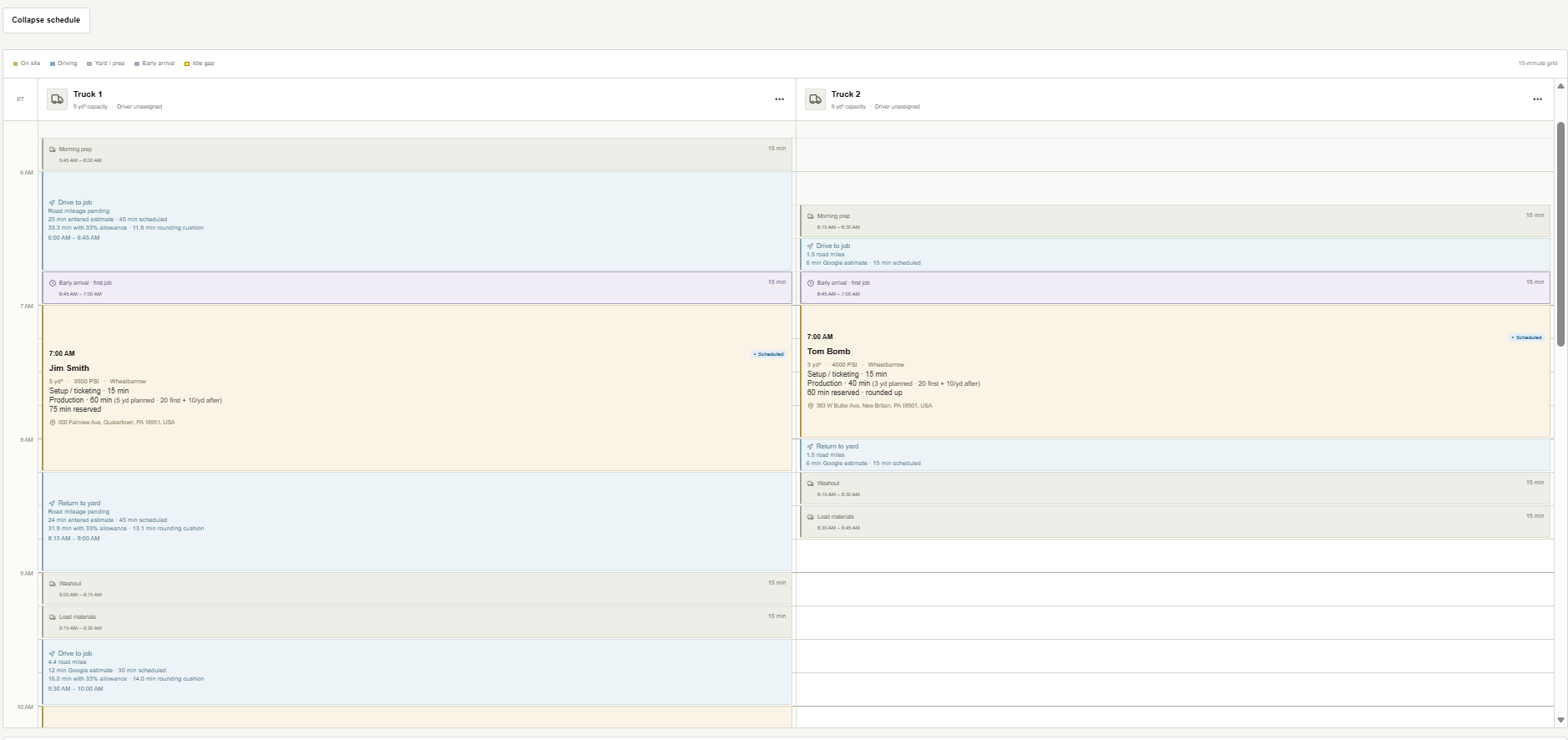
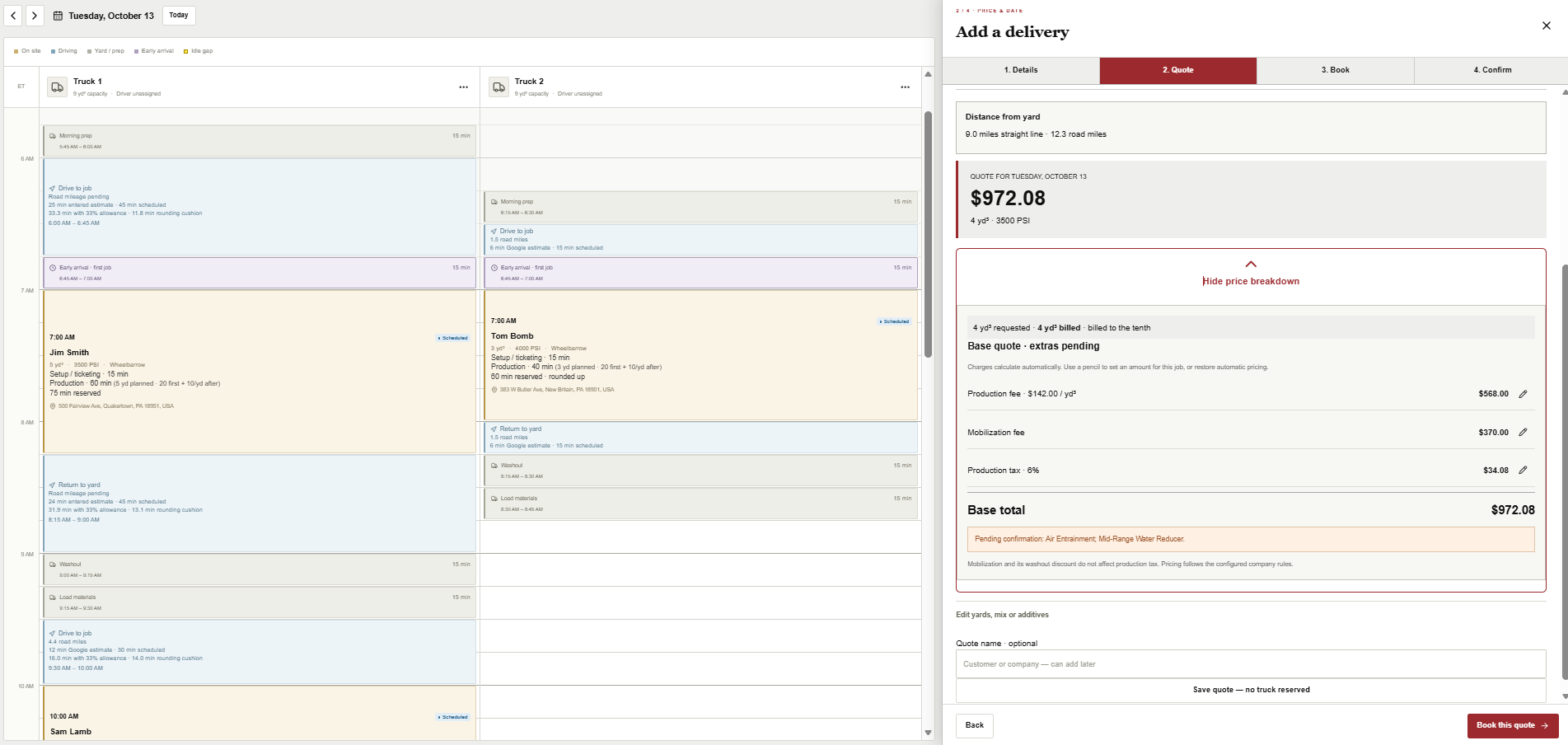
Calculated quotes and a visual truck schedule, together. See the time each job really needs before making the commitment.
● ● ●THE WHOLE DAY · TRUCK SCHEDULE
● ● ●CALCULATED QUOTE
Customer & job detailsConfigured pricingTruck availabilitySave quote or book
THE DRIVER
The next job. Already in focus.
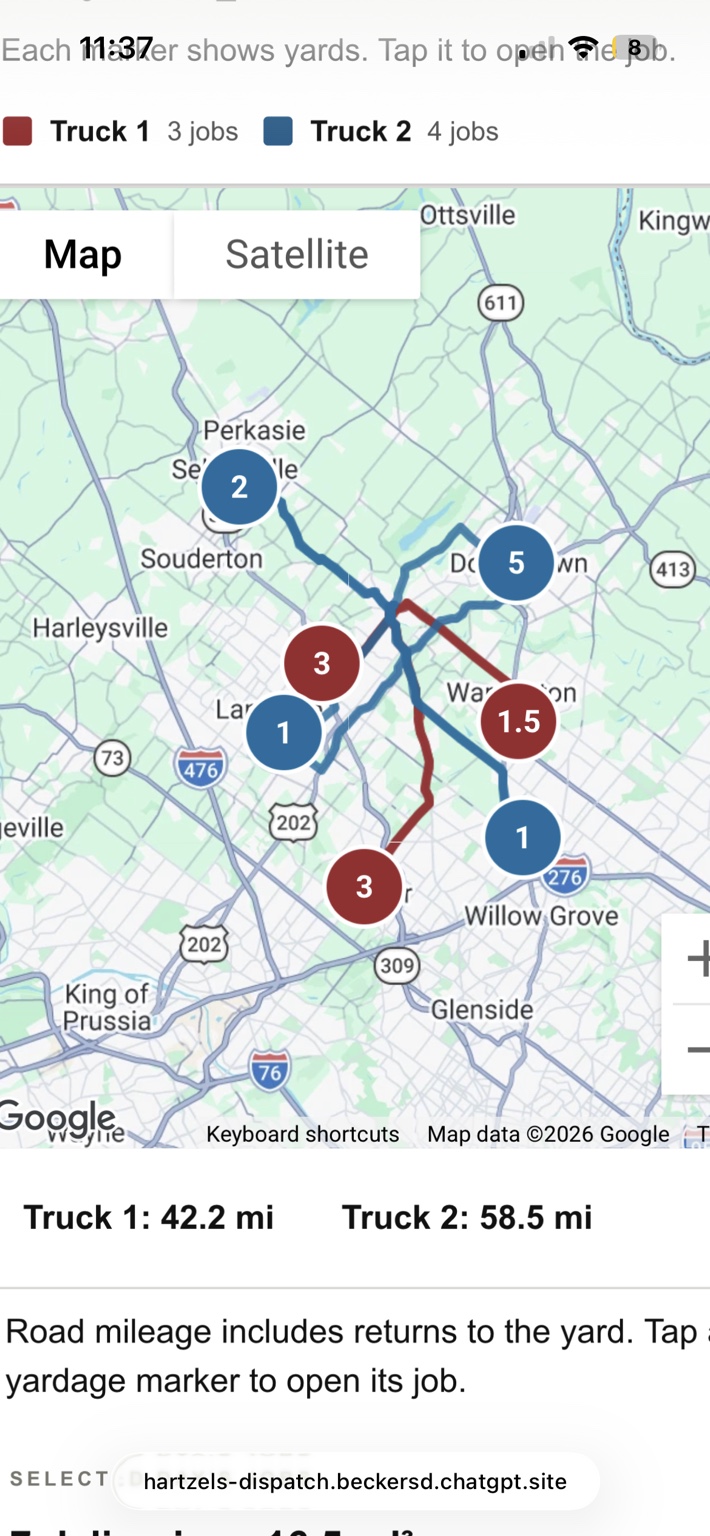
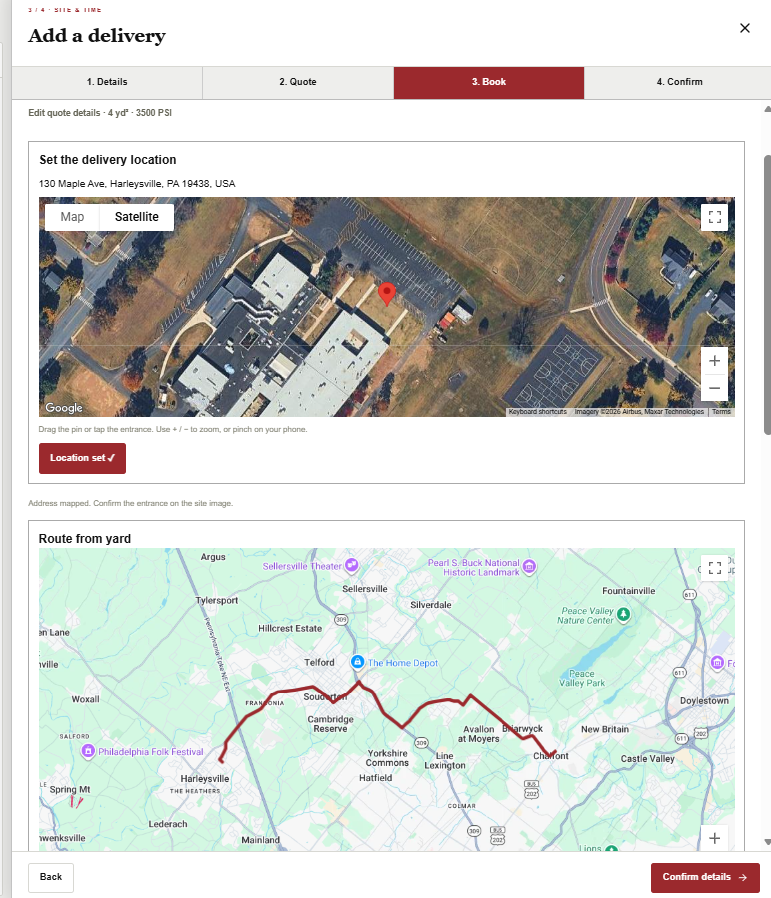
Route, site imagery and departure controls. Less calling the office. More clarity before the truck moves.
01 Review the job02 Check the route03 Record departure
● ● ●DAILY ROUTES
● ● ●SATELLITE · SITE ACCESS
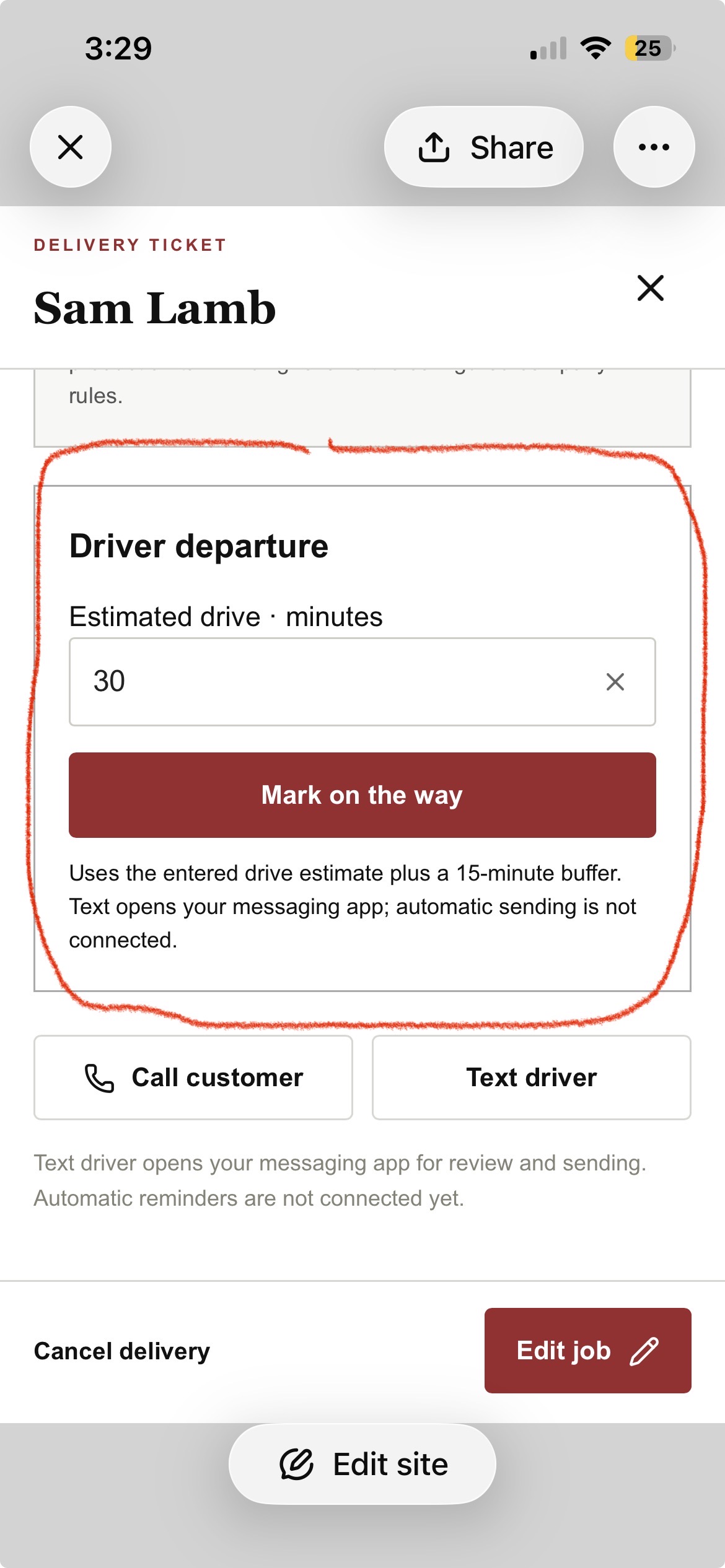
● ● ●DRIVER DEPARTURE · PILOT SCREEN
Route and site views show the shared job information; the departure control is from the pilot interface. Automatic customer texts require a configured messaging connection.
THE OWNER
Stop wondering. See the operation.
Sales trends. Truck production. Customer clusters. Time on site. Turn the day’s work into information you can act on.
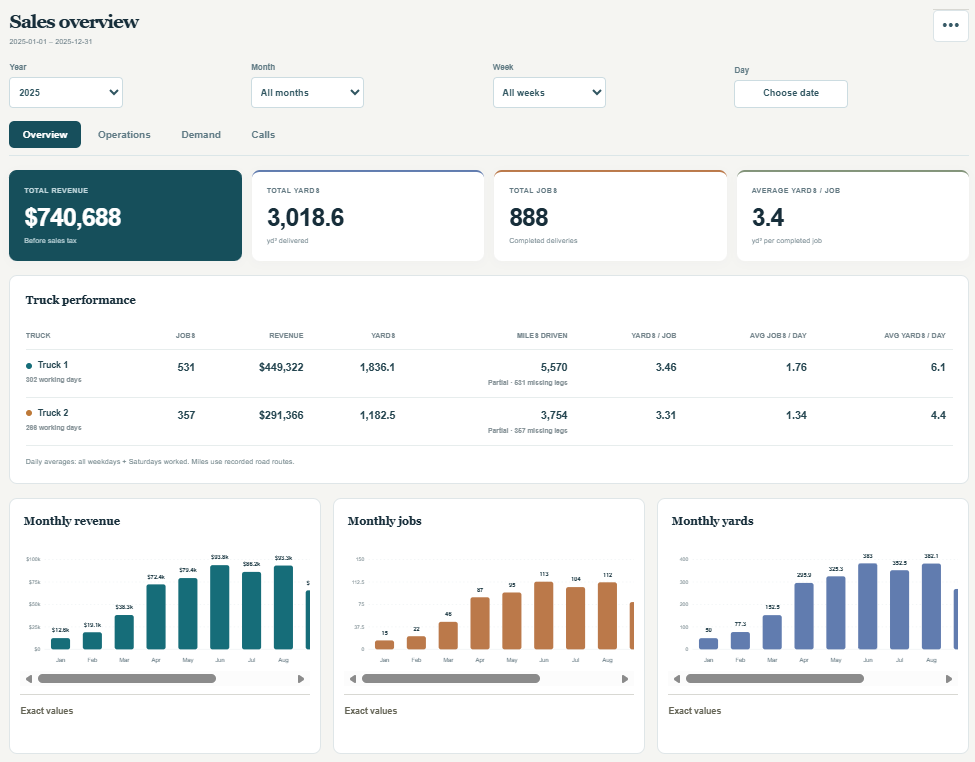
● ● ●SALES & PRODUCTION
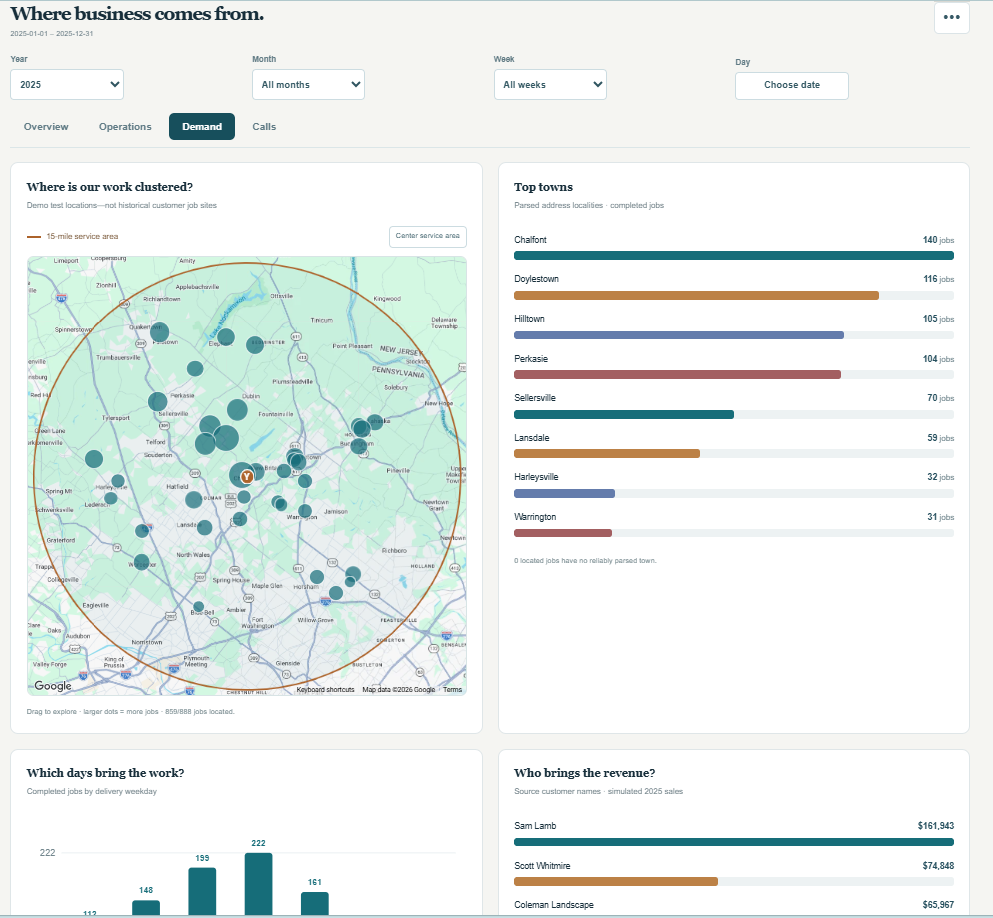
● ● ●CUSTOMER CLUSTERS & SERVICE AREA
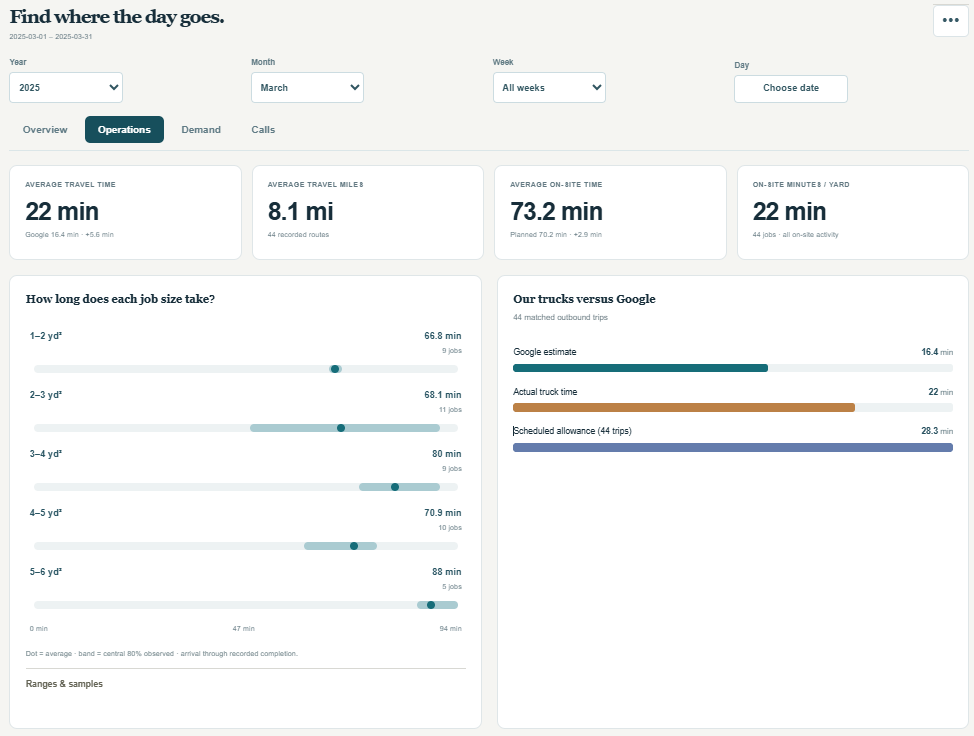
● ● ●TRAVEL & ON-SITE PERFORMANCE
Revenue & yardsJobs & truck outputWhere demand comes fromWhere time goes
Actual concrete operations screens with demo data. Screens are cropped for emphasis; use the corner arrow to open the full image. This is one industry example of a custom operations app—not a claim that every feature or integration is included in every project.
ONE CALL. ONE JOB RECORD. ONE CONNECTED OPERATION.
Follow a delivery. See the busywork disappear.
From the first price question to the last ticket of the day, the job stays with your team. Your scheduler, drivers and owner work from the same information.
The complete workflow is visible below. Messaging, scanning and accounting connections are scoped and verified during setup.
01 / CUSTOMER CALLS · SCHEDULER QUOTES
A complete quote. While they’re on the phone.
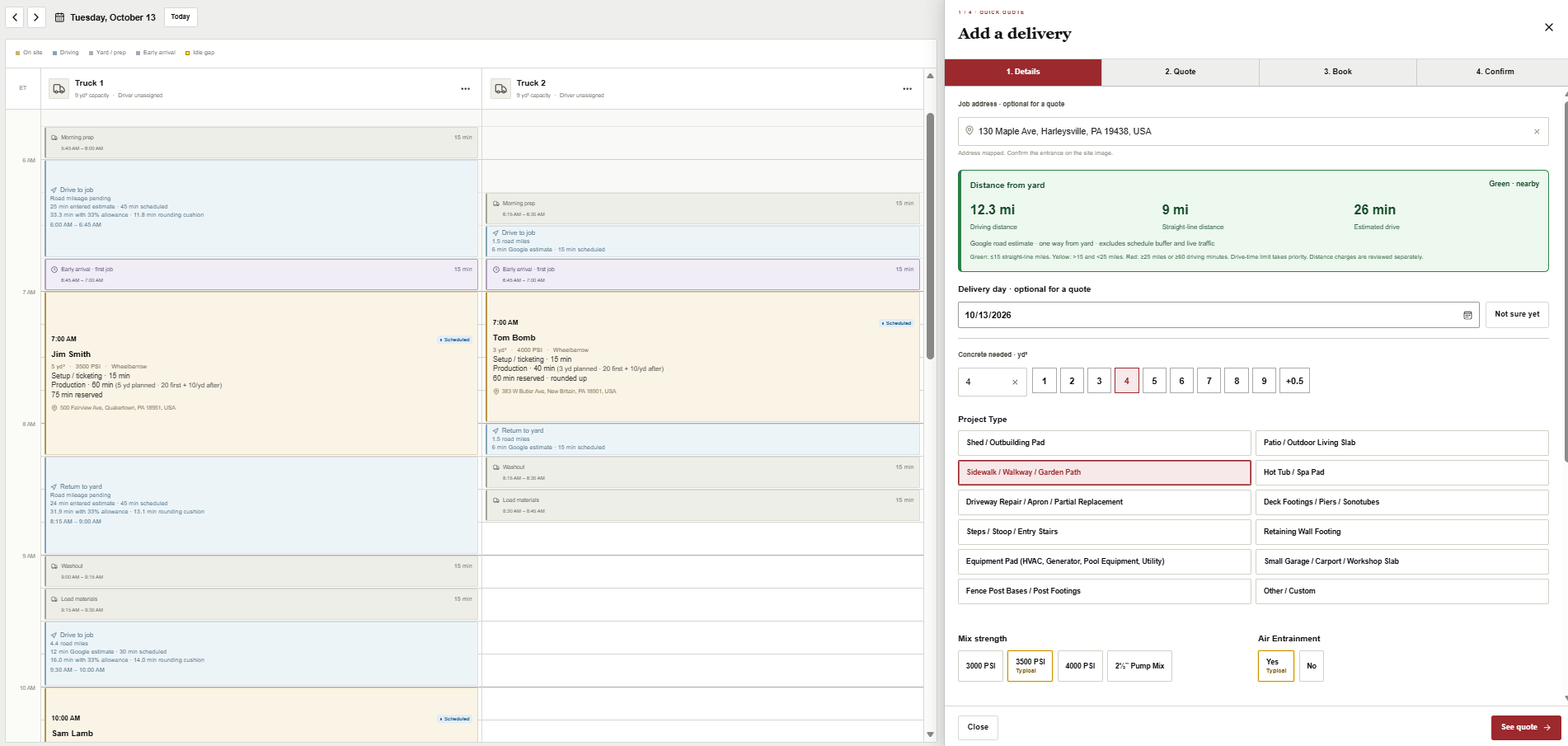
Pull up a regular customer or add a new one. Capture the delivery address, review distance and estimated travel time, then select yards, job type and mix design. Configured rates and charges do the pricing math.
No mental arithmetic. No scribbled notes. No customer numbers stored in an employee’s phone.
Job details and pricing inputs, alongside the delivery day · Actual app screen, demo data.
Customer not ready?Save the quote. Pick it up later.Ready to go?Keep the details. Book the job.
02 / SCHEDULER BOOKS · EVERYONE SEES IT
Offer times that work for the whole day.
Evaluate travel, pour time, existing commitments and truck availability before offering a window. Favor efficient sequences and protect usable capacity, instead of squeezing in a job that disrupts the next delivery.
One synchronized schedule for scheduler, owner and drivers. Less double-entry and fewer update calls.
See how each delivery fits around travel, production and yard time · Actual app screen, demo data.
Booked → customer confirmation
With messaging connected, send the booked details by text and email. Scheduling recommendations depend on your operating assumptions; they cannot guarantee a gap-free day.
03 / DRIVER GETS THE WHOLE PICTURE
Know the job. Before leaving the yard.
The driver’s day starts with truck assignment and a clear job timeline. Review the address, mix, quantity, instructions, satellite view and route before heading out.
See the site and confirm the entrance.
Review when to return for washout or refill.
Identify direct-to-next-job opportunities when timing, materials and operating rules allow.
Fewer surprises at the site. Less back-and-forth with the office.
Driver self-assignment, material tracking and direct-job routing are confirmed against your company’s configured workflow during the demonstration.
Site imagery and route stay attached to the job · Actual app screen, demo data.04 / LOAD · DEPART · ARRIVE · POUR
A few driver actions. A much clearer operation.
The intended driver workflow captures progress at the point of work, so the owner can see how the day is actually unfolding.
LOAD
Record materials
Enter starting quantities for the truck before departure.
ON THE WAY
Start the trip
Record departure, open Google Maps directions, and send an ETA update when messaging is connected.
ARRIVED
Mark arrival
Capture the arrival time against the planned delivery window.
COMPLETE
Confirm the pour
Record actual yards and completion time. Continue to the yard or the next eligible job.
Customers know what’s happening. Owners get timestamps instead of chasing updates.
Workflow illustration, not an app screenshot. Automatic texts and emails require configured providers. Material balances require validated consumption rules; navigation behavior depends on the driver’s device.
05 / CONFIRM THE TICKET · CLOSE THE LOOP
Finish the delivery. Not another evening of paperwork.
Start with the booking’s prefilled ticket, confirm actual quantities and charges, then submit. Paper-ticket scanning can be scoped as an additional capture option—with driver review before anything is recorded.
One reviewed delivery recordCustomer · actual yards · charges · completion time
CustomerInvoice or receipt, plus a review invitation through configured text and email delivery.
AccountingBulk QuickBooks Desktop export matched to your import format, or a separately configured QuickBooks Online connection.
OperationCompleted job, sale and production data; material usage where tracking is configured.
Less ticket re-entry. An organized record. A simpler path from delivery to billing.
QuickBooks exports are supported. Desktop import compatibility must be tested with your version and mapping. Paper-ticket scanning, automatic invoice/review delivery and direct QuickBooks Online synchronization require additional setup and validation.
06 / OWNER REVIEWS · THE NEXT DAY GETS SMARTER
See what happened. Improve what happens next.
Bring sales, yards, completed jobs and truck performance into one owner view. Compare planned travel and on-site time with actual timestamps to refine scheduling allowances and find lost capacity.
Make decisions from the delivery record—not a stack of tickets and everyone’s memory.
Sales and production, visible without assembling a report · Actual app screen, demo data.Travel and production patterns reveal where to investigate · Actual app screen, demo data.
Driver-level production, load consumption and departure/arrival/completion comparisons depend on captured data and enabled tracking. Distinguish estimated route mileage from actual recorded mileage.
LESS COORDINATION. MORE CONTROL.
Your people do the work. The information moves with them.
SchedulerQuote quickly. Offer practical windows. Keep regular customer details in one place.
DriverKnow where to go, what to deliver and what happens next.
OwnerReduce disconnected tools and repetitive office work. See where time and capacity are going.
BUILT FOR THE WHOLE OPERATION
More ways to work smarter.
Explore additional capabilities and configuration details.
05Take the guesswork out of scheduling
Plan around travel time, production rates, yardage, truck availability and buffers. Make realistic commitments while keeping manual overrides for special situations.
06Spend less time on administrative work
Customer records, job details and completed tickets move through one workflow. Bulk QuickBooks exports reduce repetitive accounting entry.
07Keep customers informed
Send on-the-way and arrival updates, then share a digital receipt. Current texts open the phone’s messaging app; automatic SMS requires an additional connection.
08Find the problems costing you money
Compare planned and actual delivery times, on-time performance, time on site, minutes per yard and truck utilization. See where the day gets off track.
09Turn more calls into booked deliveries
Give customers calculated quotes and available windows while you have them on the phone. Compatible call-tracking integration can add visibility into missed calls and booking conversions.
10Make repeat business easier
Keep customer histories, jobsite details and previous orders together. Review-request workflows can be configured; approved-contractor self-booking requires additional setup.
11Know when to add a truck or driver
Understand existing capacity and seasonal demand before making a major investment. Use delivery and utilization data to inform the decision—not just a full calendar.
12Plan ahead instead of constantly reacting
Use future bookings, seasonal patterns and historical comparisons to plan staffing, equipment and workload with greater confidence.
More of the practical details
Customer records and ordering history · Interactive jobsite maps and photos · Digital tickets · Configured pricing · Manual schedule overrides · Truck and driver assignments · Delivery status · Quantity variance · Customer analytics · Mobile-friendly access · Configurable business settings
Direct QuickBooks cloud synchronization, telephone analytics, automatic SMS and customer self-booking require additional integrations or configuration. We confirm your requirements and any additional costs before setup.